This post comes after 3 weeks of me feeling like a trashcan.
But now is time for redemption, I have decided to sit down (not on the couch, not watching house on the third time), read all the new blog posts about passkeys, and actually understand them.
The goal of this blog is to serve as a nice, gentle opening, for anyone who wants to understand passkeys, and scared, like me.
So lets start with the overview
What is a passkey?
A passkey is a FIDO credential that uses public-key cryptography for authentication. The private key is protected by the authenticator/passkey provider, while the relying party stores the corresponding public key.
Instead of sending a password to the server, your device or passkey provider holds a private key, while Entra stores the corresponding public key.
When you want to authenticate, your authenticator uses the private key to prove that you have the credential.
The exact implementation can vary. A passkey can be device-bound, meaning the credential stays on one device, or synced, meaning it can be securely backed up and synchronized through a cloud passkey provider.
But let’s go a little deeper.
Passkeys can provide phishing-resistant authentication, and they can satisfy MFA in a single gesture because they combine possession of the authenticator with user verification, such as a biometric or PIN.
And this is where I had my first question:
How is this different from WHfB?
One important difference for me is the portability of the credential.
Windows Hello for Business (WHfB) credentials are tied to the Windows device where they were registered. A passkey, depending on its type, can either be device-bound or synced.
For example, a device-bound passkey can live in a FIDO2 security key or in Microsoft Authenticator. A synced passkey can be available across multiple devices through a passkey provider such as iCloud Keychain or Google Password Manager.
So if I lose a device-bound passkey, I have a problem. With a synced passkey, the credential can be recovered on another device through the passkey provider.
Oh, also WHfB is only for windows.
OK, I still don’t understand anything. What now?
The key pair
A passkey is based on a pair of cryptographic keys:
- Public key: stored by Entra.
- Private key: protected by the authenticator/passkey provider.
For a device-bound passkey, the private key stays on the device. For example, Microsoft Authenticator stores device-bound passkeys using hardware-backed protection such as the Secure Enclave on iOS or the Android Keystore system on Android.
When you authenticate to Entra with a passkey, the high-level flow looks something like this:
- Authentication request – you start a login to Microsoft Entra.
- Challenge – Entra generates a challenge and sends it to the browser.
- Passkey – the browser asks the authenticator/passkey provider to respond to the challenge. If the passkey is on another device, such as a phone, a cross-device flow can be used (like scanning a QR).
- User verification – the authenticator verifies the user, for example with a fingerprint, face recognition, or PIN.
- Signature – the authenticator uses the private key to sign the authentication data.
- Verification – Entra uses the public key it has stored to verify the signature.
- Done.
And there is one important piece of information included in this process
Origin
I’m sure you’ve heard passkeys described as “phishing-resistant.”
The reason is a mechanism called origin binding.
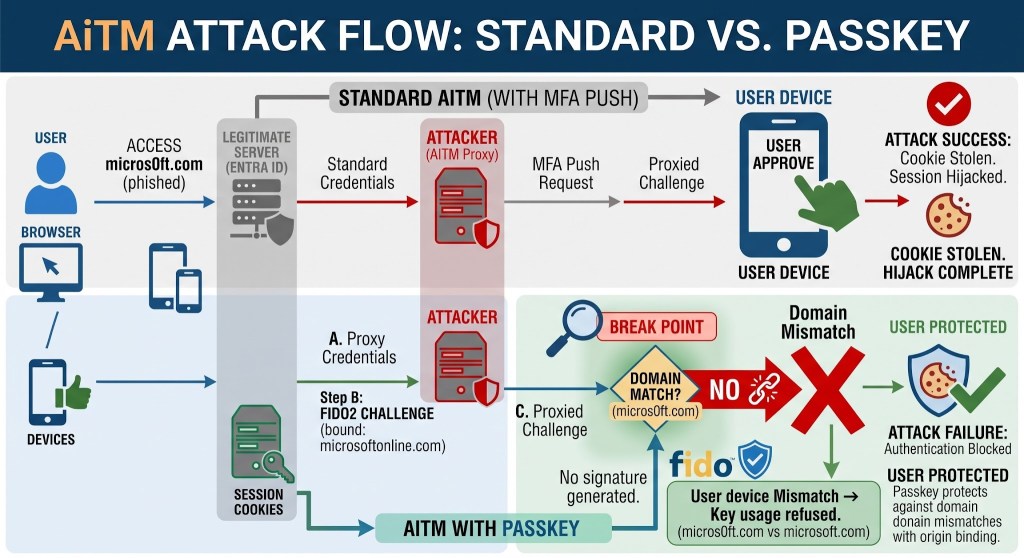
Let’s describe a common AiTM attack.
The victim gets a link to a fake Microsoft login page. For example, let’s say the attacker created: login.micros0ft.com
The victim enters their credentials into the fake page, and the attacker proxies the authentication to the real Microsoft login page.
With a password, this can work because the password isn’t inherently tied to the website where it is entered, with a passkey, it’s a bit different.
When the browser asks the authenticator to use a passkey, the authentication is tied to the legitimate relying party/origin. A passkey registered for the real Microsoft service cannot simply be used by an attacker-controlled origin (like login.micros0ft.com). The authenticator/browser enforce that relationship.
So even if the attacker passes the real Entra challenge to the victim, the passkey isn’t simply going to sign it for login.micros0ft.com.
This is the “real deal” here, the attacker can proxy the login page and the challenge, but they can’t make the victim’s passkey authenticate to the attacker’s origin.
This is what makes passkeys phishing-resistant!
DCF?
My next question was: What about Device Code Flow?
In an AiTM attack against a normal web login, the attacker can put the victim on a malicious origin, but Device Code Flow is different.
The victim is not being asked to authenticate to the attacker’s fake Microsoft login page. They are authenticating through Microsoft’s real endpoint.
That means the origin-binding protection that prevents a passkey from being used on login.micros0ft.com does not, by itself, solve the problem.
The attacker can instead try to convince the victim to complete a legitimate authentication flow that the attacker initiated.
So theoretically, device code phishing won’t be prevented by passkeys.
Now I started having questions about some of the terminology I kept seeing in different blog posts and talks about passkeys.
What is AAGUID?
In a really simple way, AAGUID is an identifier for the type of authenticator/passkey provider being used.
You can roughly think of it as identifying the model/provider of the authenticator.
For example:
- Microsoft Authenticator has an AAGUID.
- A particular YubiKey model has an AAGUID.
This can give administrators some control over which authenticators are allowed.
For example, an organization could configure Entra to allow only specific AAGUIDs corresponding to the FIDO2 security keys it provides to employees.
What is attestation?
Let’s say the administrator configured the organization to allow only specific YubiKeys.
What prevents an attacker from simply telling Entra: “Hi, I have the same AAGUID.”
Attestation!
Very roughly, attestation provides cryptographic evidence about the authenticator or passkey provider involved in registration. This allows the relying party to verify information about the authenticator rather than simply trusting what it claims to be.
So AAGUID tells us what type of authenticator we’re talking about, while attestation can provide evidence that the authenticator actually belongs to that type.
In Entra, administrators can enforce attestation and use it together with AAGUID restrictions to control which authenticators can be registered.
It is important to mention that not every passkey supports attestation.
Synced passkeys generally don’t provide the kind of authenticator attestation that organizations use to enforce specific authenticator types. As a result, enforcing attestation can effectively rule out synced passkeys in that configuration.
Synced vs. device-bound
This concept is basically asking: Can the credential be used somewhere other than the device where it was created?
With device-bound passkeys, the private key is created and protected on a specific physical device and doesn’t leave that device.
Examples include FIDO2 security keys and passkeys in Microsoft Authenticator.
The advantage is a strong device boundary: the private key remains protected by the authenticator and isn’t synced to another device.
But it also has a disadvantage, if you lose the device, you lose the credential and need a recovery mechanism.
With synced passkeys, the credential can be securely backed up and synchronized through a cloud passkey provider. This means that when you get a new phone, for example, you can recover the passkey through the provider instead of registering an entirely new credential.
So… is WHfB a subtype of device-bound passkey?
Conceptually, they have a lot in common in the sense that the credential is protected on the device. But WHfB and Entra passkeys are distinct authentication mechanisms (according to MS), so I wouldn’t treat them as identical.
And now that we’re not completely clueless, we can try to understand the last blog post by Dirk-jan!
- I encourage you to just read it, but if, like me, you lack some of the knowledge needed to understand it, maybe this overview can help.
What happens if the attacker is already on the machine?
In his post, Dirk-jan describes a technique that requires the attacker to establish two things:
- Run on the victim’s machine. No need to be admin/system.
- The machine needs to have an active WHfB session.
Instead of stealing the private key, which is exactly what the TPM is supposed to prevent, the attacker can interact with the Windows cryptographic APIs and ask the system to perform a signing operation using the WHfB credential.
In theory, requesting a cryptographic operation using the WHfB credential should involve user verification, but Dirk-jan discovered that under the conditions he describes, Windows can rely on the existing WHfB authentication state instead of requiring the user to perform fresh biometric verification.
It is important to mention, that the attacker still doesn’t steal the private key, the key remains protected by the TPM.
Instead, the attacker abuses the legitimate machine and its existing authenticated state to make the system perform a cryptographic operation on their behalf.
The result is that, under those conditions, an attacker can use the WHfB credential without the user necessarily knowing that it happened, and potentially obtain authentication tokens or register another credential.
Does this contradict everything we learned about passkeys? Not really.
- It is still device-bound. The private key didn’t leave the TPM.
- It is still phishing–resistant. This isn’t an attack against the phishing resistance of WebAuthn. The attacker already has code execution on the victim’s machine.
But it does teach us something important. One of the security properties we associate with WHfB is local user verification, the “something you are” or “something you know” part.
Now we know that fresh user verification isn’t necessarily required for every operation performed using an existing authenticated session.
What about registering a passkey?
Another interesting thing Dirk-jan mentions at the end of his blog is a new method for registering passkeys.
I find this very interesting because, with passkeys becoming increasingly important in Entra, I expect attackers to become increasingly interested in registering their own credentials.
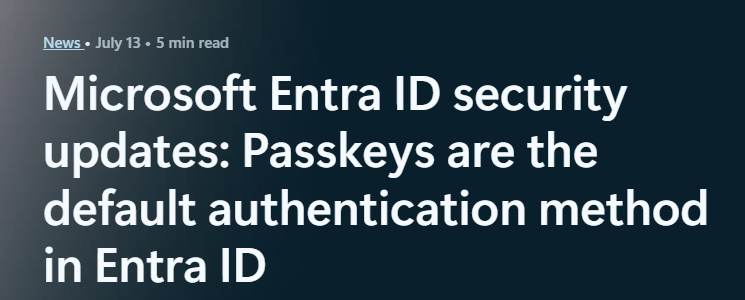
We actually already saw this: https://www.okta.com/blog/threat-intelligence/vishing-actors-target-microsoft-entra-passkey-enrollment-/
In order to register a passkey from a terminal rather than using a real hardware authenticator, attackers needed to solve two problems.
1. Creating the passkey
Most WebAuthn-related libraries were designed around communicating with real authenticators such as YubiKeys.
Here, the goal was different: create a passkey completely in software.
2. User handle
When registering a passkey with Microsoft, the protocol requires a value called user_handle.
It isn’t something you normally have to think about as a user, and it is not very documented.
Dirk-jan did some RE and found how Microsoft generates this value and used that to solve the second problem.
The interesting part is that this method can also work after Device Code phishing https://x.com/0x64616e/status/2085799628910313844.
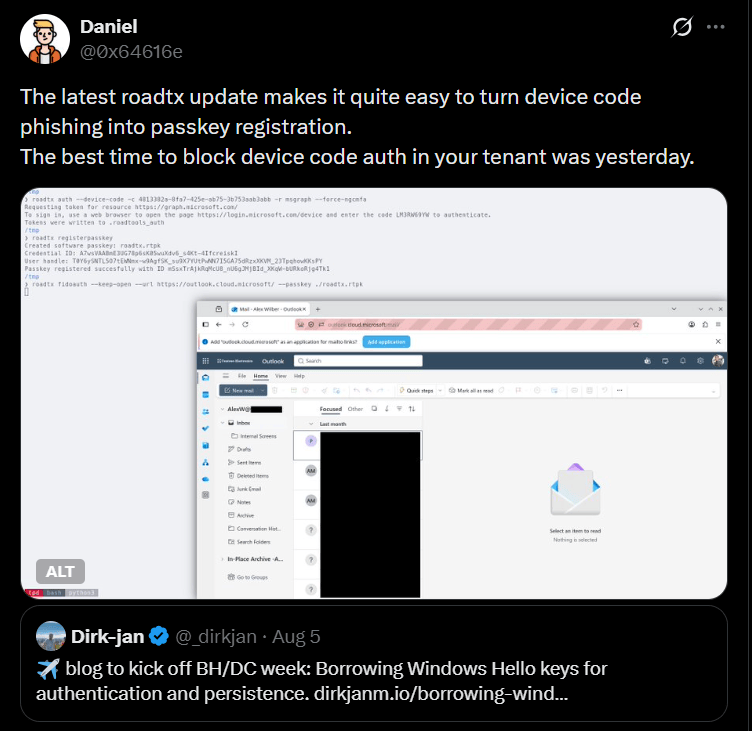
And that’s really scary since device code phishing is sooooo common.
Now that we understand attestation, we can also see why enforcing appropriate attestation can prevent this particular software-created credential from being accepted.
The passkey created by roadtx is completely software-based. It doesn’t have the attestation or AAGUID of a trusted hardware authenticator.
So an organization that requires attestation for the relevant passkey profile can prevent this kind of software-created credential from being registered.
So what did I actually learn?
Some basic concepts, some flows, some differences, and mainly, that i still have a lot to learn.
But, I feel just a bit less dummy now (:
Hopefully I’ll be back soon with another Passkeys for Dummies, covering the scary white paper by Michael Grafnetter.


Leave a Reply