FOCI and BroCI appear in many great research papers, conference talks, and attack write-ups. Even after reading most of them, I realized I couldn’t confidently explain how either mechanism actually worked. Every time I tried, I found another gap in my understanding.
This post is my attempt to fix that.
Instead of summarizing existing research, I wanted to build the mental model myself and answering the questions that came up along the way. Some of those questions led to small side quests, while others are still unanswered.
As I said, many great pieces of research have already been made on these topics. Here is a list:
- Troopers – Fabian & Dirk-Jan
- SpecterOps – Hope Walker on BroCI
- NetSPI – BroCI CAP bypass
- SecureWorks – FOCI
- Probably many more
Step #1: FOCI
FOCI (Family of Client IDs) is a concept where, by getting a token to one client, you can exchange it for a token to a different client that belongs to the same family. This way, the user doesn’t need to authenticate again to get an access token for another app.
All of the currently known FOCI applications are documented in entrascopes.
My first question was: How do you know an application belongs to FOCI? The answer is that Microsoft includes the foci claim in the token response when you authenticate to the application.
Here is an example: This is an ROPC request to Microsoft Office:

This ROPC authentication command results in the following response:

That’s really good to know. Now, it is also easy to understand how to detect all of the clients inside FOCI.
Side Quest: The secaud Claim
These extra claims that only exist for FOCI clients made me wonder if there are more interesting claims we only see for specific apps. This quest led me to the secaud claim.
This claim exists in some app+resource combinations, and it contains two sub-claims:
audscp
Let’s see an example from a token I got when I authenticated to Teams with the Skype resource:

As you can see, the scp inside the secaud is different and wider than the scp of the main token.
The Plain-English Version of this claim
Think of an access token as a visitor badge. The aud is the building the badge lets you into.
When you get a Teams token, the badge says: “Front desk: this is the user. Let them into Teams.” That’s aud
But inside the same badge is a smaller note: “P.S. Teams, if you need to walk over to the Microsoft Graph building on this person’s behalf, you’re pre-approved to do these specific things there: read/write their mail, read/write their groups…” That’s secaud
So, secaud indicates delegated permissions the receiving service may use when acquiring downstream tokens. It lets the service you’re talking to (Teams) turn around and call another service (Graph) for you, without going back to the login server to ask for a fresh token.
I don’t think you can use it yourself, I tried. The aud of my token was Skype, and when I tried to pass it to Microsoft Graph, I got an invalid token error. Maybe there is a specific method to use these tokens to access Microsoft Graph, but I haven’t found it yet.
After collecting tokens from several application/resource combinations, I ended up with the following Graph secaud values.
| Combo | secaud.scp |
| Office / Outlook + Exchange | Mail.ReadWrite, Files.Read, Group.ReadWrite.All, User.Invite.All, Policy.Read.All, LicenseAssignment.Read.All, DataLossPreventionPolicy.Evaluate, SensitiveInfoType.Detect/Read.All, SensitivityLabel.Evaluate, User.Read |
| Teams + Exchange | Group.Read.All, Group.ReadWrite.All, User.Invite.All, Policy.Read.All, LicenseAssignment.Read.All, User.Read |
| Teams + Skype | Mail.Read, Mail.ReadWrite, MailboxSettings.ReadWrite, Sites.ReadWrite.All, Group.ReadWrite.All, Directory.Read.All, People.Read, Place.Read.All, ProfilePhoto.Read.All, User.ReadWrite |
| Teams + Substrate | Group.Read.All, Sites.Read.All, LicenseAssignment.Read.All, User.Read |
| OneDrive + SharePoint | Directory.Read.All, User.Read.All, User.Invite.All, User.RevokeSessions.All, Organization.Read.All, GroupMember.Read.All, GroupSettings.Read.All |
Exchanging FOCI Tokens
Now, back to FOCI. Now that I know how to find these apps, I wanted to see what it looks like to exchange a FOCI access token for another FOCI access token.
I used ROPC for authentication since I wanted to stick to a case study where attackers only have a password. After the first authentication (which was to Microsoft Office with the Microsoft Graph resource),I tried to ask a token for Microsoft Teams (also FOCI), using my refresh token from the previous request.

And I indeed got a new access token, again with the FOCI claim. So, it’s basically using the standard refresh token process but refreshing it to a different client ID.
As a sanity check, I tried to use it to access the Microsoft Azure CLI (which is not a FOCI client), and, as expected, I got an invalid_grant error.
Lets summarize this part with a cute FOCI flow:
Office (FOCI client) │ │ authenticate ▼use refresh token │ ▼Teams (FOCI client) │ ▼new access token
Step #2: BroCI (Broker / Hosted Apps)
Now that I understood FOCI, the next obvious thing was to understand BroCI.
Now, I’ll be honest with you: I read the blog posts, and I watched the talks. But every time I think I’ve got it, I try to explain it to someone else and discover unanswered questions I’m not sure how to resolve. That’s why I’m doing this.
Certain Microsoft applications embed other applications inside them. Rather than every embedded application performing its own authentication flow, Microsoft allows the host (“broker”) to obtain tokens on behalf of the hosted application.
I’m going to explain it in a way that makes me understand it better. We have 3 identities here:
- User
- Broker application
- Hosted application
The concept is that some applications are nested (hosted) inside other applications. The most common example that everyone uses is the Azure Portal and Ibiza. We all know Ibiza is hosted inside the Azure Portal, up to that part, everything makes sense.
The goal of this flow is simple: if I’m currently authenticated to the Azure Portal and want to access information that Ibiza provides (like Users for example), Ibiza asks the broker to get a token for the user on its behalf. The Azure Portal will then use the refresh token it holds to request this new token for Ibiza.
Let’s see an example using Burp Suite. First, I got a completely normal token for the Azure Portal (notice the client ID):

- Azure Portal = c44b4083-3bb0-49c1-b47d-974e53cbdf3c
The response yields a refresh token, an access token, and an OpenID token.
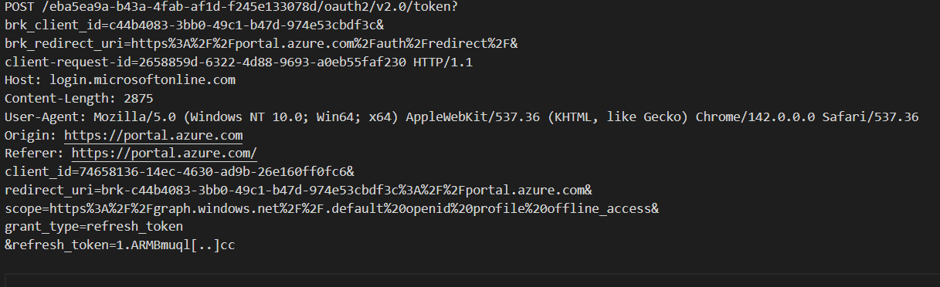
Now, I am using that refresh token and performing this request:
And a cute BroCI flow:
           User
            │
            │ authenticate
            ▼
      Azure Portal
     (Broker App)
            │
            │ refresh token
            ▼
      Entra ID
            │
            | access token
            ▼
         Ibiza
      (Hosted App)
Let’s understand what we see here. I’m asking for a token using some new fields:
brk_client_id-> In our case, the Azure Portalbrk_redirect_uri-> Will be explained later in the postclient_id-> Ibiza (the app that needs the Azure Portal to ask for a token)refresh_token-> The RT we got when we authenticated to the Azure Portal
The response from this process is an access token for Azure Ibiza. I can see why Microsoft implemented this idea, it is for the same reason they implemented SSO, minimal user interactions for maximum user comfort.
Finding the Brokers
Now that I understood the concept, I had some questions.
1. How can I find the brokers? For a given app, how can I tell if it uses NAA (Nested App Authentication)?
The answer is: using the reply URL! These broker redirect URIs are exposed through application objects (often visible on the corresponding Service Principal), and you can find them using the Graph API. For example, if we run this query:
https://graph.microsoft.com/beta/servicePrincipals?$filter=appId eq 'bb2a2e3a-c5e7-4f0a-88e0-8e01fd3fc1f4'
We will get information about the “cpim service,” a random first-party application. In its reply URLs, we can see the following:
"replyUrls": [ "https://*.cpim.windows.net/*", "brk-c44b4083-3bb0-49c1-b47d-974e53cbdf3c://rc.portal.azure.com", "brk-c44b4083-3bb0-49c1-b47d-974e53cbdf3c://canary-ms.portal.azure.com", "brk-c44b4083-3bb0-49c1-b47d-974e53cbdf3c://ms.portal.azure.com", "brk-c44b4083-3bb0-49c1-b47d-974e53cbdf3c://preview.portal.azure.com", "brk-c44b4083-3bb0-49c1-b47d-974e53cbdf3c://canary.portal.azure.com", "brk-c44b4083-3bb0-49c1-b47d-974e53cbdf3c://portal.azure.com", "https://proxy.b2clogin.com/tenantredirect/authresp", "https://login.microsoftonline.com/te/tenantredirect/authresp", "https://te.cpim.windows.net/tenantredirect/authresp"]
This means the cpim service is an NAA that can be brokered by the Azure Portal (if you translate the GUID).
We can see it can be brokered by azure portal with multiple URIs. Another question I had is: What is the importance of the host? Why we need 6 different broker URIs for Azure Portal?
The answer: Anatomy of the URI
brk-c44b4083-3bb0-49c1-b47d-974e53cbdf3c://ms.portal.azure.com└┬┘ └──────────────┬──────────────────┘ └────────┬────────┘ │ │ │"broker" the BROKER's client ID the web page that (Azure Portal) actually started the login
So one URI packs two different identities:
- Who brokers the token → the client ID in the scheme (Azure Portal).
- Which web page is allowed to receive it → the host.
NAA exists so a web app running inside a host (like an add-in or component loaded inside the Azure Portal) can get tokens through that host, instead of doing its own login.
- The nested app says “get me a token.”
- The broker (Azure Portal) does the actual auth with Entra.
- Entra validates the registered redirect URI, and browsers treat each origin separately, so each portal hostname requires its own registered broker redirect URI.
That last step is something i needed to understand: the broker doesn’t live at one single URL. Azure Portal is served from many different hostnames:
| Host | What it is |
|---|---|
portal.azure.com | normal production portal |
ms.portal.azure.com | Microsoft-internal |
canary.portal.azure.com | Not sure actually |
preview.portal.azure.com | preview |
rc.portal.azure.com | Not sure actually |
Each of those is a separate browser origin. The browser treats ms.portal.azure.com and canary.portal.azure.com as completely different websites, a token meant for one is not allowed to be delivered to the other.
So Entra has to know, ahead of time, the exact origin it’s allowed to hand the token back to. That’s why every host needs its own registered redirect URI. The client ID alone isn’t enough, it tells Entra which broker, but not which of the broker’s many front doors the response is allowed to come back through.
Digging Into Unknown Brokers
Something I noticed in entrascopes and in my own validations is that some of the broker URIs point to an unknown application or are structured a bit differently. I downloaded all the apps from entrascopes and ended up with these unknown client IDs acting as brokers:
| # | Unknown Broker Client ID | Rels | Apps | Nested Apps That Trust It |
| — | brk-multihub (no client ID → Unknown app) | 214 | 37 | Spread across Office, Copilot Studio, Yammer, M365Chat, etc. |
| 1 | c836cbdb-7a5b-44cc-a54f-564b4b486fc6 | 13 | 9 | Azure Service Linker, CPIM Portal Ext, AppInsights Ext, Graph Data Connect, ActivityLog, Monitoring Alerts, EMM ModernWorkplace, OperationsManagementSuite, Verifiable Credentials Admin |
| 2 | 2821b473-fe24-4c86-ba16-62834d6e80c3 | 25 | 4 | M365ChatClient, Office Online Add-in SSO, Office Online Core SSO, OfficeHome |
| 3 | 865367a6-9c28-4844-88ce-259d34dbabae | 10 | 2 | Office Online Add-in SSO, Office Online Core SSO |
| 4 | 6c162bf8-dda4-4ec3-8c3c-b816baadab88 | 10 | 2 | Office Online Add-in SSO, Office Online Core SSO |
| 5 | 14e3d5b3-8888-4eb1-9343-e4aca764b965 | 10 | 2 | Office Online Add-in SSO, Office Online Core SSO |
| 6 | 03b184b5-8cb6-45d1-bef1-10db52790f06 | 12 | 1 | Windows 365 Portal |
| 7 | 96f7e131-7b0f-4947-8a62-9cd027b94147 | 12 | 1 | Windows 365 Portal |
| 8 | 1c65024a-5992-4a60-b9be-c40b388283e0 | 8 | 1 | Microsoft Engage Hub |
| 9 | 00000000-0000-0000-0000-000040170455 | 1 | 1 | Copilot App (FOCI, public client) |
| 10 | 0b1df6d3-2deb-44d4-b44b-7101937e0726 | 1 | 1 | M365ChatClient |
I assume these are undocumented applications? Based on their hosts, it looks like most of them are mostly office-related apps: *-oauth.officeapps.live.com.
I tried to authenticate to some of these using the device code flow to learn more about them, but the authentication failed because these are confidential apps. However, I did discover some information about them based on the errors I received:
App ID Verdict Name / Origin--------------------------------------------------------------------------------------------------------------0b1df6d3-2deb-44d4-b44b-7101937e0726 EXISTS Origin: outlook.office.comc836cbdb-7a5b-44cc-a54f-564b4b486fc6 EXISTS Origin: *.azure.us / entra.microsoft.us (Gov)2821b473-fe24-4c86-ba16-62834d6e80c3 EXISTS Origin: *.officeapps.live.com865367a6-9c28-4844-88ce-259d34dbabae EXISTS - MSA (consumer) only OneDrive Web Consumer / Origin: *.officeapps.live.com6c162bf8-dda4-4ec3-8c3c-b816baadab88 EXISTS Origin: *.officeapps.live.com14e3d5b3-8888-4eb1-9343-e4aca764b965 EXISTS - DISABLED DEVApp Home Pages / Origin: *.officeapps.live.com03b184b5-8cb6-45d1-bef1-10db52790f06 EXISTS Origin: windows365 / deschutes96f7e131-7b0f-4947-8a62-9cd027b94147 EXISTS - blocked by evaluation policy Origin: windows365 / deschutes1c65024a-5992-4a60-b9be-c40b388283e0 EXISTS Origin: engagehub / portal.azure.com
Then, I remembered I could use the interactiveauth module in roadrtx, which opens a Selenium-based browser and performs the auth code flow for you. This is an amazing capability, when you need to authenticate to apps the requires PKCE.
But even with the correct reply URI and the interactiveauth module, I didn’t succeed in authenticating to them. Based on the errors, I think I used the wrong scope (which is a bit surprising because I used Microsoft Graph).
- I ended up discovering most of these applications, and I’m currently working on a PR to entrascopes to update them.
The Conditional Access Policy Bypass – By NetSPI
One very interesting thing is the Conditional Access Policy (CAP) bypass found by NetSPI. It’s actually one of the reasons I wanted to do this small quest. I read it, and it’s written extremely well, yet I felt like I lacked some basics to truly understand it. Now that I feel like I understand this concept pretty well, I can happily send you to read the blog post they wrote!
Some spoilers: NetSPI found several BroCI flows where Conditional Access evaluation could be bypassed under specific conditions.
So, if you stole a refresh token for the Azure Portal (which is a very realistic real-world scenario), you could use the BroCI flow to get an access token for Ibiza, specifically with the Microsoft Graph resource, while bypassing any CAP. They also found this vulnerability in other combinations, which are documented in their blog post!
Conclusion
One thing I didn’t expect when I started writing this post was how many new questions would appear once I finally understood the basics.
At first, my goal was simply to understand how FOCI and BroCI actually worked. But once I could reproduce the authentication flows myself, I found myself paying attention to things I had ignored before: undocumented brokers, unusual redirect URIs, claims like secaud, and applications that don’t quite fit the patterns described in previous research.
I don’t have answers to all of those questions yet, and that’s probably my favorite part. Building the mental model was only the beginning. Now I have a much better idea of where to look next.


Leave a comment