For the purpuse of this post, i’m using the following token (decode using https://jwt.ms/)
{
  "aud": "https://graph.microsoft.com/",
  "iss": "https://sts.windows.net/eba5ea9a-b43a-4fab-af1d-f245e133078d/",
  "iat": 1720542691,
  "nbf": 1720542691,
  "exp": 1720548216,
  "acct": 0,
  "acr": "1",
  "aio": "AYQAe/8XAAAApYy2VT/RGzNAINSFMNo55m5d6sNi6AZfFyQlNDDegS52lz+ili4p0F8rH/5j45WVFJvQVRxmE2rfgW3s+XKUIK0FBC+Wob5DmRze+1o37QXzrq16m8yyZezUEpeX6tpNJnaqUA2+uB9M86Gkmd3Lvr8WEY74aPDrqRaPxVXCmmI=",
  "altsecid": "1:live.com:0003BFFDCDA97EAB",
  "amr": [
    "pwd",
    "mfa"
  ],
  "app_displayname": "Microsoft_AAD_UsersAndTenants",
  "appid": "f9885e6e-6f74-46b3-b595-350157a27541",
  "appidacr": "0",
  "email": "sapirfederovsky@gmail.com",
  "family_name": "federovsky",
  "given_name": "sapir",
  "idp": "live.com",
  "idtyp": "user",
  "ipaddr": "2a0d:6fc2:5fe0:4300:d811:d8e0:a304:7164",
  "name": "sapir federovsky",
  "oid": "020e1a91-c1a3-4d7e-8991-f5a4ab6050b0",
  "platf": "3",
  "puid": "10032003A1A2C9DA",
  "rh": "0.ARMBmuql6zq0q0-vHfJF4TMHjQMAAAAAAAAAwAAAAAAAAAATAQA.",
  "scp": "AdministrativeUnit.ReadWrite.All AuditLog.Read.All Directory.AccessAsUser.All Directory.Write.Restricted email IdentityRiskyUser.Read.All openid Organization.Read.All Policy.ReadWrite.Authorization profile PublicKeyInfrastructure.ReadWrite.All User.EnableDisableAccount.All User.ReadWrite.All",
  "signin_state": [
    "kmsi"
  ],
  "sub": "jFYhS_1q5M5BwxS_tBSngF8K2ER5kdrjvvXH7nkwxx0",
  "tenant_region_scope": "EU",
  "tid": "eba5ea9a-b43a-4fab-af1d-f245e133078d",
  "unique_name": "live.com#sapirfederovsky@gmail.com",
  "uti": "WlyUIrN7UkGNyk7Tmv5jAA",
  "ver": "1.0",
  "wids": [
    "62e90394-69f5-4237-9190-012177145e10",
    "b79fbf4d-3ef9-4689-8143-76b194e85509"
  ],
  "xms_idrel": "1 16",
  "xms_st": {
    "sub": "kKvLi263mde4dsE4Z3jB9ezwXKVDSI0qPnQ1xCwkJfg"
  },
  "xms_tcdt": 1720437592
}
Aud : “Identifies the intended audience of the token.”
Note to MS, you can’t use the word audience in the definition of “aud”. It’s like explaining what stupid is by saying “something that is stupid”.
Long story short – MS definition confuses me, so let’s create a new definition.
I started with the basics, using Azure portal I accessed “Users” tab and looked at the token:
The “aud” value is https://graph.microsoft.com/
The query to retrieve users is https://graph.microsoft.com/Users .
OK, things are getting clearer now.
Just to make sure I understand, I clicked on “Log analytics workspace”, because I wanted a token to different audience. Now my “aud” value was: https://management.core.windows.net/
Which make sense, because the query I performed to retrieve my Log analytics workspace was https://management.azure.com/subscriptions/<GUID>/resourcegroups/<resourceGroupName>/providers/microsoft.operationalinsights/workspaces/<logAnalyticsName>?api-version=2015-11-01-preview
So, I think our new definition to “aud” can be:
The domain that provides the API to retrieve the wanted information.
For EntraID things, It mostly Microsoft.graph.com. (:
When we want to use tools such as RoadRecon etc, we call to the internal API, which provided by the “deprecated” domain – graph.windows.net.
Now I wonder… what we see in the Sign-In logs? Is there a value representing the “aud”?
Iss: “Identifies the STS that constructs and returns the token, and the Microsoft Entra tenant of the authenticated user.”
Well, this one is decent.
STS means “Security Token Service”, this is the server that issues and validates the tokens.
In our case, the STS structure will be: https://sts.windows.net/<TenantID>/
Acct: Shows us the users account status in tenant
0 – member
1 – guest
Acr: only exists in v.10 tokens. Means “Authentication context class” (So what the “r” represents?)
A value of 0 indicates the user authentication didn’t meet the requirements.
Aio: “An internal claim used by Azure AD to record data for token reuse. Should be ignored.”
Well, ok, I guess I’ll ignore this one.
Amr: this is an easy one, it shows us how the subject of the token was authenticated. For example {pwd,mfa}
appId: “The application ID of the client using the token. The application can act as itself or on behalf of a user. The application ID typically represents an application object, but it can also represent a service principal object in Azure AD.”
I think it might be a bit confusing. So, let’s authenticate with an application and check the token:
To do that, I created an app and added a secret to it (you can do it using the GUI, BRAK, azure-cli etc) Then, I used
BARK and run the following:
(Get-MSGraphTokenWithClientCredentials -ClientID <appID> -ClientSecret <appSecret> -TenantName <tenantName>).access_token
{
  "aud": "https://graph.microsoft.com",
  "iss": "https://sts.windows.net/eba5ea9a-b43a-4fab-af1d-f245e133078d/",
  "iat": 1720543995,
  "nbf": 1720543995,
  "exp": 1720547895,
  "aio": "E2dgYGBv+lC1cGPaSxbLb7bv1u9oBAA=",
  "app_displayname": "sapir_test_app",
  "appid": "26f938ec-279f-41d8-9fbc-c0bb0484e002",
  "appidacr": "1",
  "idp": "https://sts.windows.net/eba5ea9a-b43a-4fab-af1d-f245e133078d/",
  "idtyp": "app",
  "oid": "d678461e-b201-4957-9cd3-8ab2490f13db",
  "rh": "0.ARMBmuql6zq0q0-vHfJF4TMHjQMAAAAAAAAAwAAAAAAAAAATAQA.",
  "sub": "d678461e-b201-4957-9cd3-8ab2490f13db",
  "tenant_region_scope": "EU",
  "tid": "eba5ea9a-b43a-4fab-af1d-f245e133078d",
  "uti": "6JGGblN5xkW2icqdQcBrAA",
  "ver": "1.0",
  "wids": [
    "0997a1d0-0d1d-4acb-b408-d5ca73121e90"
  ],
  "xms_idrel": "7 2",
  "xms_tcdt": 1720437592
}
Well, this time the app is the account we authenticated with. I think there are many different things here so we should understand it as a separate token, later.
Back to our user access token. The app here is a first-party app, that represents the following “Microsoft_AAD_UsersAndTenants”. (We can see this value in the app_displayname).
If we search this appId we will find the documentation saying this is a first-party application.
It means that this app resides inside MS tenant. Some of these apps have some ServicePrincipal representation in our tenants, this one doesn’t, I actually didn’t know this is possible.
Appidacr: This indicates how the client was authenticated. Sounds like amr, but it can contains 3 values:
0 – public client
1 – if client ID and client secret are used
2 – if client certificate was used for authentication
This introduced me to the following concept:
Public clients and confidential client applications
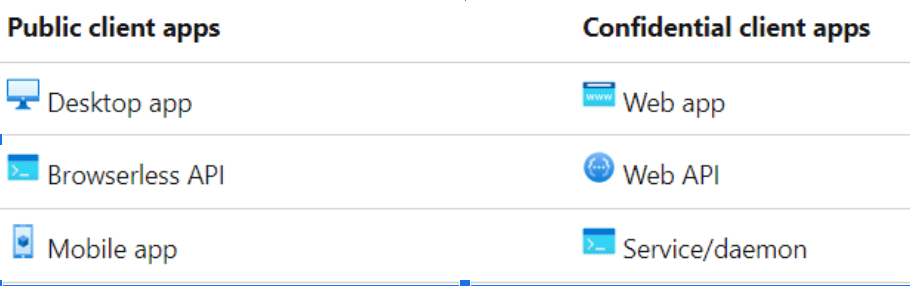
Basically – if you run on device – you’re public app. If it’s hard to RE your code – you’re confidential app.
Idtype: “The value is app when the token is an app-only token. This claim is the most accurate way for an API to determine if a token is an app token or an app+user token.”
Oid: this is the userId , or the appId if you authenticated with an app (:
Platf: i couldn’t get any info of this value. It existed only in my user’s token. Not the app token. And it’s value was 3. I found this on a random search:
“Restricted to managed devices that can verify device type.”
When I authenticated from MAC, I got 5.
When I used aadinternals on windows VM I got 14. When I used roadrecon auth from the same vm, I got 3.
After authenticating from 4 different windows machines, I’m pretty sure at this point “3” represents windows host.
I would like to test it with token from joined device, and linux machine as well.
BTW, you don’t get this value for application tokens from what i have seen.
Puid: again, can’t find a lot of information. The only thing I found is “User PUID User Identifiable Information”. So it’s some sort of identifier.i found this definition under “systemUser” page. But this is not a system user, so I’m not sure why it have PUID, and who uses it.
Thanks to @cnotin who referred me to this page – AADInternals info I now know the answer!
“alternativeSecurityId” = base64 value of the binary value stored in hex in “puid” of the access token
For example “puid” = “1003200218CB68E3” -> “alternativeSecurityId.key” = “EAMgAhjLaOM=”
And I knew I recognized it from somewhere !
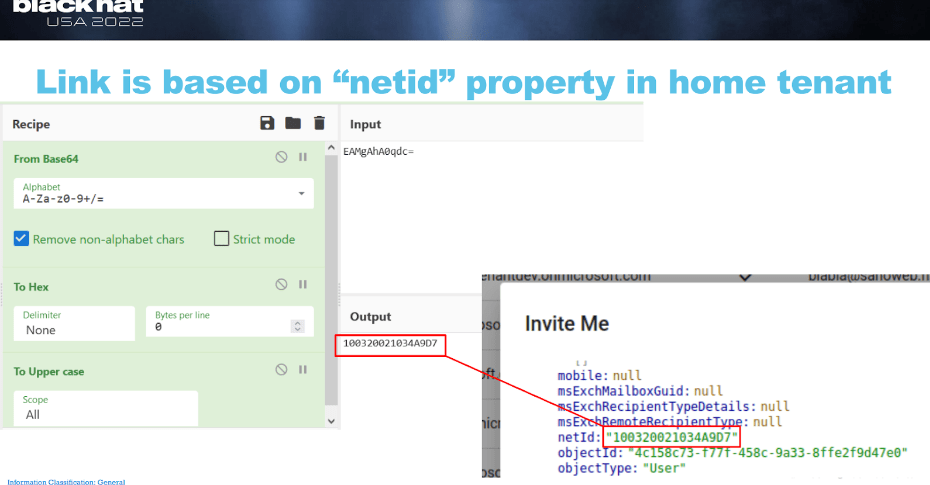
Aha! This was presented by dirk-jan which describes here very cool attack that is no longer relevant since MS fixed it! But IIRC he said MS changed the netid attribute. Looks like they just change its name to PUID lol.
Rh: “An internal claim used by Azure to revalidate tokens. Should be ignored.”
Scp: “The set of scopes exposed by your application for which the client application has requested (and received) consent. “
This one is quite interesting. Sometimes I see tokens similar to the one I displayed here, where the scope is a list of API permissions. But sometimes I see the following scope, and I always wanted to know what it means:
“scp”: “user_impersonation”
I found this definition:
“The user impersonation scope grants all capabilities associated with all groups the principal is a member of.”
So I guess its pretty clear now. I also found this somewhere:
“user_impersonation – Requests an on-behalf-of access token from AD FS”
Signing_state: the value here was kmsi, which means keep me signed in, this happens after you clicked “yes” when you prompted for the keep me signed in question.
Sub: or subject. “The principal about which the token asserts information, such as the user of an app…”
For apps, this will be the servicePrincipalId, for users, it’s something weird.
“The subject is a pairwise identifier that’s unique to a particular application ID. If a single user signs into two different applications using two different client IDs, those applications receive two different values for the subject claim. “
tid: this is the tenant id of the account that the token belongs to.
unique_name: “Provides a human readable value that identifies the subject of the token. This value is not guaranteed to be unique within a tenant[…]Only issued in v1.0 id_tokens.”
this is hilarious, the unique name is not guaranteed to be unique.
I wonder in which cases it’s not unique.
Upn: this can be the UPN of the account, but also a phone number, email, etc
Uti: “An internal claim used by Azure to revalidate tokens. Should be ignored.”
Ver: version of the token, I think it’s correlated to Oauth1.0/Oauth2.0
Wids: these are role Ids! Which might be interesting IMO.
When I checked the app token wids, I saw GUID that doesn’t represent any roleID (“0997a1d0-0d1d-4acb-b408-d5ca73121e90”).
After another quick talk with @cnotin we conclude this might be some sort of default role for servicePrincipals. But its undocumented.
xms_tcdt: this represents time. I just not sure what time.
I tried to understand what xms means in general. when you look at different claims you can add to your app , you can see the following:

So, im not sure what xms means but it looks not very interesting.
Ideas:
Can we use wids to detect token manipulation? Since I noticed MicrosoftGraphActivityLog provide the wids for every API call. So if it takes the wids from the token, we can compare them with the roles of the account, and maybe detect token manipulation! Kinda like detecting silver tickets.
What are the permissions the “default” SP role (“0997a1d0-0d1d-4acb-b408-d5ca73121e90”) provide? Can we assign it to an account?

Well, maybe next time.
Comparing some sign-in log fields to token claims:
I took the log that represents my login to azure portal
AppId & appDisplayName – 
User details (UPN,Id,etc) –
AuthenticationMethodsUsed – i thought this will be like amr, but it was empty for me
resourceId:
I always confuse app and resource, so I think this comparison can be nice:
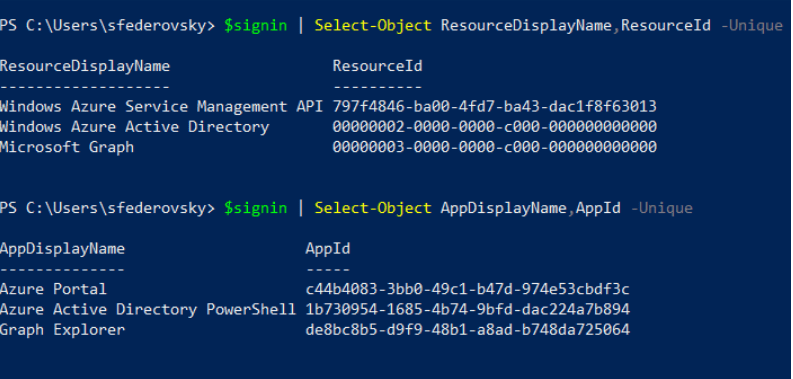
So, the “aud” in the token, is the resource.
For example, in my token the “aud” was https://graph.microsoft.com
We can use the first-party json from roadtools to see the mapping between resources and audience

well, that’s it for now. I hope you learned something new (:

 Sapir's failed research blog
Leave a comment